Write in Docs, publish to the web: my zero-maintenance blogging setup
I love writing in Google Docs. It’s on my laptop, my phone, it autosaves, the spell check is good enough and I never have to think about it. What I don’t love is the ritual of turning a doc into a blog post: copy, paste, fix the formatting, fiddle with Markdown, commit, push, wait, and then notice a typo and do it all over again.
My blog has been served for free from GitHub Pages for a while now, and that part is great. Static files, no servers, nothing to patch. So the goal was simple: keep the boring, reliable backend exactly as it is, and make the front end as easy as opening a doc and typing. Publishing should be totally automatic.
I paired with Claude Code on this one afternoon and it turned into a nice case study in a theme I keep coming back to: the conversation is where the good decisions happen.
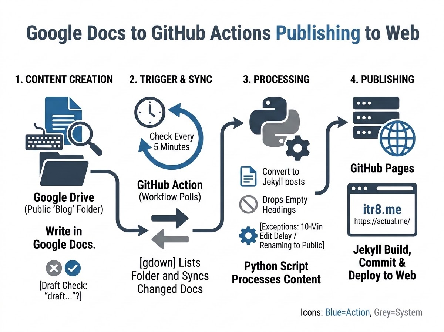
How it works now
- Every Google Doc in a public “Blog” folder in my Drive is a blog post.
- If the first word of the title is “draft” (any capitalization, punctuation ignored), it isn’t. “Draft: my idea”, “[DRAFT] my idea” and “draft - my idea” all stay private. “Drafting a plan” does not!
- Every 5 minutes, a GitHub Action checks the folder, converts any new or changed docs into Jekyll posts, commits them, and redeploys the site.
- Rename a doc back to “Draft…”, or move it out of the folder, and the post comes down.
That’s it. I write, I rename the doc when it’s ready, and it shows up on itr8.me.
The back and forth
Push or pull?

The first fork in the road: should Google push content to GitHub, or should GitHub pull from Google?
Push sounds faster, using Apps Script to send changes to GitHub. But it turns out Apps Script can’t react to edits on arbitrary docs, so it ends up polling on a timer anyway. Pull, using a GitHub Action on a schedule, keeps all the logic in the repo, under version control, right next to the site it builds. We went with pull.
Key decision:
When two options end up behaving the same, pick the one that keeps everything in one place. Future me will thank present me for not having a mystery script living in a second system.
How do you tell a draft from a post?
We kicked around Drive labels (those need a paid Workspace plan), hidden doc properties (not editable in the Docs UI, so not “easy”) and separate Drafts/Published folders. I went with the simplest rule I could think of: if the first word of the title is “draft”, it’s a draft. Nothing to configure, and you can see the status right in the doc list.
Don’t publish half a sentence
Docs saves constantly, which is wonderful until an automated job grabs your post mid-thought. So the sync waits until a doc has gone 10 minutes without an edit before publishing it. Two exceptions came out of the conversation:
- Renaming a doc from “Draft…” to a real title publishes on the next run. That rename *is* the decision to publish, so no waiting.
- Running the workflow by hand from the Actions tab is a “publish now” button that skips the wait entirely. I added this after I made an edit, hit run, and realized it would just sit there for 10 minutes. 😅
“Why do I need step two?”
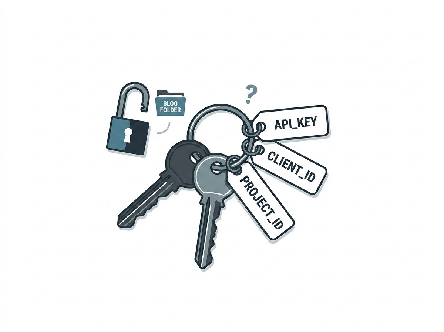
The first version used the official Google Drive API, which meant setting up a Google Cloud project and an API key. I asked the obvious question: why do I need that, when the folder is public anyway?
The honest answer was “you mostly don’t.” Downloading a public doc works without a key. The hard part was listing the folder with last-edited times, which the 10-minute rule depends on. So we went digging. An open source tool called gdown had already figured out that Drive’s public folder page embeds every file’s ID, title, type and last-modified time (down to the millisecond) right in the page. Claude couldn’t reach Google from its sandbox, so it pushed a tiny throwaway workflow to GitHub Actions to fetch a real folder page and print what was in it. Confirmed: the timestamps were there.
There’s one catch: that page only lists the first 50 items. So the sync fails loudly when a folder hits 50, rather than quietly unpublishing the posts it can’t see. Subfolders work too, so older posts can move into a “2025” folder when the time comes.
Key decision:
Asking “why?” about a setup step turned an API key, a cloud project and a secret into… nothing. The pushback made the design simpler. Never be shy about questioning a requirement, especially one that adds moving parts.
Things that bit us (and the fixes)

No new pipeline survives first contact with reality. A few highlights:
- No code blocks in Docs. I went looking for Docs’ code block feature (Insert → Building blocks) and it simply wasn’t there on my account. Fine: I type three backticks before and after the code, like in Markdown, and the sync cleans up the escaping Google adds when it exports the doc.
- Stray “#” symbols. Blank lines styled as Heading 1 in the doc showed up on the page as literal “#” characters. The sync now drops empty headings.
- The commit that didn’t deploy. Commits made by a GitHub Action using its built-in token don’t trigger other workflows. So the sync, build and deploy all live in one workflow, one after the other.
- The deploy that broke for unrelated reasons. The very first deploy failed. Not because of anything new: the workflow pinned a 2023 version of the Ruby setup step, and GitHub had moved its runners to Ubuntu 26.04 in the meantime. One version bump later, green.
- Curly braces in code. Jekyll treats {{ }} as template syntax, which would mangle any code sample that uses it. Every synced post is wrapped so its content comes through exactly as written.
- Images just work. Insert a picture in the doc and the sync saves it as a real image file next to the post.
Everything got tested before it went live: unit tests for the sync script, local Jekyll builds, and screenshots of the rendered pages. Seven pull requests in one afternoon, each one small and reviewable. Yes, I’m still a Conventional Commits fan.
While we were in there
Since the site was getting attention anyway, I finally swapped the Twitter link for LinkedIn and Bluesky, trimmed the footer down to just the links, and gave my email a little Gmail icon so it matches the rest.
Summing up
The whole setup is a public Drive folder, a few hundred lines of Python and one workflow file. No servers, no API keys, no monthly bill. Writing a post now means opening a doc. Publishing means renaming it.
The more interesting part for me was how we got there. The best ideas didn’t come from the first plan. They came from the back and forth: a “why do I need this?”, an edit that didn’t go out when I expected, a stray “#” on my phone screen. Clear questions, quick experiments and small changes. Iterate, you might say. 🙂
This post was written in Google Docs and published by the pipeline it describes.